GreenCampGear
0H6680D Nexus Controller Control Panel Assembly Fit for Generac 2010-2012 8kW 15kW 20kW 22kW Air-Cooled Standby Generators Replaces 0H6680DSRV Not Compatible with 0H6680A 0H6680B
0H6680D Nexus Controller Control Panel Assembly Fit for Generac 2010-2012 8kW 15kW 20kW 22kW Air-Cooled Standby Generators Replaces 0H6680DSRV Not Compatible with 0H6680A 0H6680B
Couldn't load pickup availability
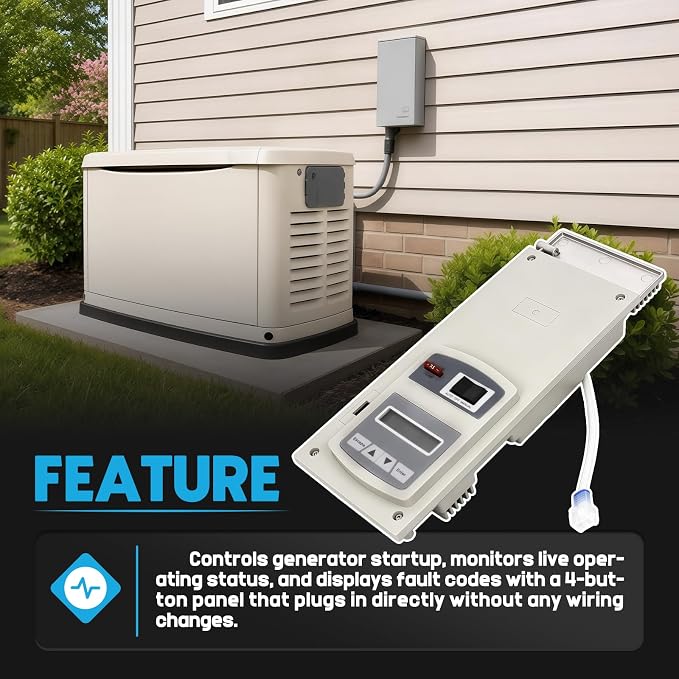
- When your Generac Nexus controller fails, you may notice the generator not starting during outages, persistent LCD error codes, or loss of automatic fault shutdown. Our replacement control board restores consistent signal accuracy across oil pressure, temperature, and speed channels, bringing automatic startup and fault detection back to factory behavior - 【Compatibility Models】Fit For Generac Air-Cooled Home Standby Generator 8kW, 9kW, 10kW, 14kW, 15kW, 17kW, 20kW, 22kW Guardian Series 2010-2012. Also compatible with same-platform Honeywell, Centurion, Siemens, and Eaton units. Verify your existing board number before ordering - 【Replace Part Number】0H6680D, 0H6680DSRV (Also matches: 0H6680) NOTE: This is a direct replacement for existing 0H6680D boards only. NOT compatible with 0H6680A or 0H6680B boards, and NOT a replacement for 0H6680T or 0H6680E controllers - 【Easy 6-Step DIY Installation】 Designed for a straightforward, plug-and-play installation with direct-fit wire harness connectors: 1.Safety Power-Off (CRITICAL): Turn off generator breakers, pull the 7.5A fuse, and disconnect the negative (-) battery cable to prevent short circuiting. 2.Remove Outer Plate: Unscrew the front fascia screws to remove the protective cover. 3.Unfasten Old Controller: Remove the 3 mounting screws holding the faulty control module. - 4.Swap Harnesses: Pinch and unplug the old wire harness connectors, then insert them firmly into the new board until they snap in place. 5.Reassemble & Power Up: Secure mounting screws, reinstall fascia plate, reinsert 7.5A fuse, and reconnect the negative battery cable. 6.Run Setup Wizard: Power on the generator and complete the initial LCD setup sequence. - 【Initial Setup Wizard】 (Prevents "No Response / No Software" Errors) Pre-programmed with universal Nexus firmware! Upon initial power-up, the LCD screen will light up and initiate the Install Wizard sequence. The controller will NOT activate or output voltage until this wizard is completed! Simply use the front soft keys to: 1) Select Language (ENGLISH); 2) Set Current Date & Time (in 24-Hr format); 3) Configure Weekly Exercise Day, Time, and Quiet Test Mode (YES/NO). Once completed, switch to AUTO for complete standby readiness. - 【Full Function Restoration】Restores generator control and monitoring capabilities, including LCD display, status alerts, Auto / Off / Manual operation modes, exercise scheduling, and error code diagnostics - 【Premium Material】Built with a rigid plastic housing, metal internal components for stable electrical connections, and rubber seals around buttons and connectors to help keep moisture and dust away from the circuit board. Designed for the temperature changes and humidity exposure common in outdoor standby generator installations - 【Buy With Confidence】Purchase the Pasangui Nexus Controller Assembly with confidence, backed by a 1 year warranty. Should it malfunction, contact us for a prompt replacement. Your satisfaction and peace of mind matter to us every step of the way
Shipping & delivery
Shipping & delivery
Shipping rates are calculated and displayed at checkout. Processing times and delivery estimates are available in our Shipping Policy.
Returns & support
Returns & support
Questions about an item or order? Our support team is here to help. Please review our Return Policy for complete eligibility and timing details.
Why GreenCampGear
Why GreenCampGear
We bring together practical outdoor finds for campsites, gardens, patios and everyday life outside.
Share