GreenCampGear
4W Solar Panel 7.75x7.75 Inch Waterproof Panel with Swivel Mount USB-C Adapter Security Camera Power Supply Outdoor Installation Kit
4W Solar Panel 7.75x7.75 Inch Waterproof Panel with Swivel Mount USB-C Adapter Security Camera Power Supply Outdoor Installation Kit
Couldn't load pickup availability
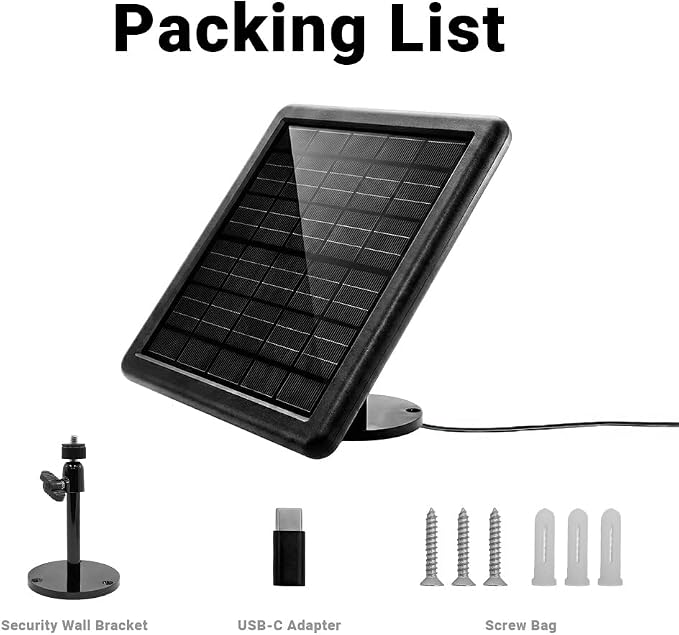
- POWER OUTPUT: Delivers 4W of power at 5V through a 69.5-inch micro-USB cable with included USB-C adapter, perfect for powering outdoor security cameras and small devices - COMPACT DESIGN: Solar panel measures 7.75 x 7.75 x 0.5 inches, offering efficient power generation in a space-saving form factor - VERSATILE MOUNTING: Features 360-degree adjustable mounting bracket with included hardware for optimal sun positioning and secure installation - WEATHER RESISTANT: Built to withstand outdoor conditions with waterproof construction and operates in temperatures from 14°F to 122°F - COMPLETE KIT: Includes solar panel, mounting plate, adjustable arm, mounting screws with anchors, and USB-C adapter for hassle-free installation
Product description
Power Your Cameras with the Sun
Installation Instructions
Installation Instructions
Installation Instructions
Installation Instructions
Upgrade your outdoor camera setup with the SensorWorks 4W Solar Panel for reliable, maintenance-free power. This compact 7.75x7.75 inch panel delivers consistent 5V power through its generous 69.5-inch cable, ensuring your security devices stay operational without interruption. The versatile mounting system allows for optimal sun positioning, while the weatherproof design withstands temperatures from 14°F to 122°F. With included USB-C and Micro-USB options, this complete kit offers an eco-friendly solution for powering your outdoor electronics. Experience the convenience of solar energy and reduce your reliance on traditional power sources.
Mount it on exterior walls, fences, sheds, railings, or trees?wherever your camera gets the best sun exposure.
If you want less maintenance, fewer outages, and more peace of mind, solar is the upgrade your camera setup needs.
Step 1: Mount the bracket
Select a location that receives ample direct sunlight throughout the day. Using the mounting base as a template, mark the screw positions on your wall or roof. Drill the necessary holes and insert the included wall anchors. Align the bracket base with the holes and use the provided screws to fasten it securely to the surface, ensuring a stable foundation for the panel.
Step 2: Fix the solar panel
Once the bracket is firmly installed, align the threaded mounting point on the back of the solar panel with the screw tip of the bracket arm. Rotate the solar panel clockwise onto the bracket until it is securely attached. Ensure the connection is tight to prevent the panel from shifting during high winds or bad weather.
Step 3: Adjust the panel
Loosen the adjustment locking mechanism on the bracket slightly to allow for movement. Tilt and swivel the solar panel so that it faces the direction of the strongest sunlight (typically South in the Northern Hemisphere). Once you have positioned the panel at the optimal angle to maximize solar energy absorption, tighten the locking mechanism to hold it in place.
Step 4: Connect with Security Camera
Route the charging cable from the solar panel to your security camera. Insert the connector firmly into the camera’s power port. If your camera has a waterproof cover or silicone seal, ensure it fits snugly around the cable connector to maintain weather resistance. The camera will now begin drawing power from the solar panel to keep your battery charged.
Shipping & delivery
Shipping & delivery
Shipping rates are calculated and displayed at checkout. Processing times and delivery estimates are available in our Shipping Policy.
Returns & support
Returns & support
Questions about an item or order? Our support team is here to help. Please review our Return Policy for complete eligibility and timing details.
Why GreenCampGear
Why GreenCampGear
We bring together practical outdoor finds for campsites, gardens, patios and everyday life outside.
Share